
If you have ever worked on an app or dashboard that pulled data from more than one place, you have probably felt that dreaded moment where something… hiccups. I have seen developers stare at loading wheels like they were waiting for a sign from the universe. Modern development is fast, but data? Sometimes it moves like it’s stuck in 2008. That’s why Denodo has been showing up in conversations among data engineers, and thus we bring all about Denodo and how it Helps Developers Avoid Data Hiccups.
In today’s post, we are going to check out what Denodo is, its Architectural flow, how Denodo helps, a real world scenario, what the difference is between Tableau and Denodo, and Denodo and Snowflake. Without further ado, let’s get started!
What is Denodo
Officially, Denodo is a data virtualization platform. But most folks and developers hear “virtualization” and think about servers, containers, or something that definitely belongs in a different conversation. Denodo gives you a single, clean, consistent view of all your data, no matter where it comes from, without moving or copying anything.
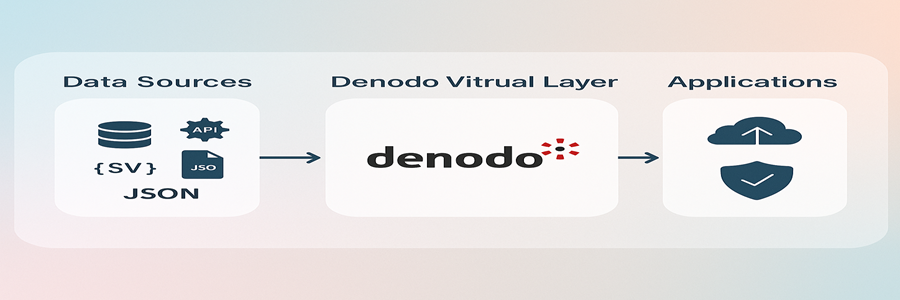
Your Data may sit in
- MySQL
- Oracle
- MongoDB
- SAP
- S3
- APIs
- Excel sheets
- CSV dumps
- Data warehouses
- Data lakes
- Third-party apps
And Denodo fetches, blends, transforms, and delivers it in a simple, unified format. You don’t need to write ten different connectors or weird Python scripts just to clean and merge data anymore. Denodo totally handles that for you.
Architectural Flow
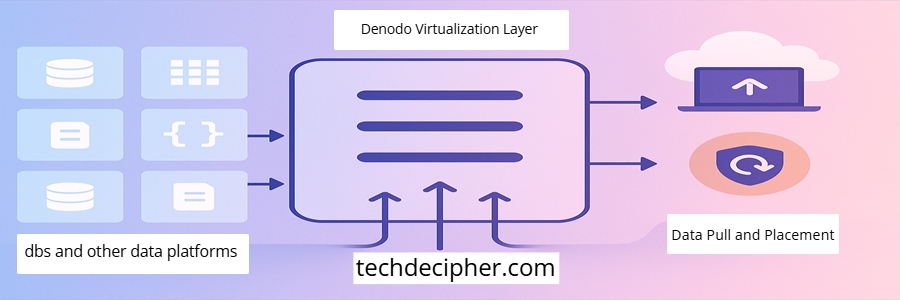
Denodo connects to all your messy, inconsistent data sources without copying anything. It adds a smart virtualization layer that joins, cleans, masks, secures, and standardizes data in real time. Developers query simple logical views that look like clean SQL tables, no matter the source format. Apps consume unified data effortlessly while Denodo handles all the complexity underneath.
How Denodo helps developers
The real reasons why developers rave about Denodo.
1) Eliminates Unnecessary Data Copies

When data is pulled traditional way:
- Copies create chaos.
- Out-of-sync datasets.
- Version mismatches.
- Duplicate ETL runs.
Denodo avoids this entirely by not copying anything. It just virtualizes it.
- One version.
- One view.
- Real-time.
2) Speeds Up Queries Through Smart Optimization

Denodo isn’t just a pass through tool. It actually analyzes your query and “pushes down” parts of it to the source systems for better performance.
Meaning:
- Joins happen at the database
- Filters execute where the data lives
- Huge datasets don’t get dragged across networks
Developers notice the difference immediately.
3) Simplifies Development With Low-Code Modeling

You can drag and drop datasets, preview queries, and build new virtual views in minutes. I’ve watched junior devs build what used to take senior engineers weeks. That’s the advantage of low-code + data intelligence.
4) Strengthens Security and Governance
Denodo centralizes:
- access control
- data masking
- row/column level security
- auditing
Developers don’t have to manually secure 15 data sources. It’s all in one place.
Real World Scenario
Imagine an IT company has the following setup
Customer details are stored in MySQL, transactions flow into Snowflake, product information sits inside Salesforce, and every application event is logged to AWS S3. Each system works well on its own, but the moment someone from Marketing asks for a real-time customer dashboard, the entire data team quietly panics.
Why?
Because traditionally, meeting this requirement means stitching together multiple moving parts: building ETL pipelines, scheduling nightly sync jobs, cleaning data, merging schemas, loading everything into a centralized warehouse, and then hoping nothing breaks during the refresh cycle. Even after all this effort, the dashboard usually reflects data that is already hours old.
This is where Denodo changes the story
Instead of building heavy pipelines, you simply connect to each data source as it is. Denodo lets you create virtual views that sit on top of your existing systems, visually join them without copying data, and expose a single unified API to your consumers. The underlying data remains in MySQL, Snowflake, Salesforce, and S3.
Denodo just brings it together on demand
- No data movement.
- No duplicated datasets.
- No 12-hour batch jobs.
- No waiting for the refresh windows.
Because Denodo queries the authoritative sources directly, the dashboard becomes truly real time, and as a result, developers get instant insights. The experience feels almost instantaneous, and that’s the modern data magic Denodo enables in real enterprise environments.
What is the difference between Tableau and Denodo?
This question comes up a lot, especially among beginners.
What is the difference between Denodo and Snowflake?
This is where people often get confused. Snowflake and Denodo are completely different animals.
Conclusion
If there is one thing I have learned watching teams evolve their data strategies, it’s, the fewer moving parts, the fewer headaches. Denodo takes the moving literally out of data integration. By virtualizing instead of duplicating, optimizing instead of overprocessing, and developers finally get a smoother, cleaner experience. This concludes all about Denodo and how it Helps Developers Avoid Data Hiccups. What do you think of Denodo? Do you plan to use it in your project? Do let us know in the comments section below. Just wondering, are you looking for the best accessories for developers in the Era of AI? Well then, you should check the blog here for more. If you need any help or have any suggestions to make, then do reach out via the contact page here. I also provide services to help you with your issues, which you can find here. Happy Lebanon Independence Day!