
Have you ever felt frustrated with the setup steps before you even start coding, installing dependencies, configuring environments, and figuring out the terminal errors? Then Replit might be exactly what you need. It’s not necessary that you should be a Software Dev Engineer to come up with revolutionary ideas, right?. Replit is your go-to platform to bring your ideas to life, and in this blog, I will show you how to build apps and sites using Replit.
In today’s post, we are going to check out what Replit is, how to build a Website, an Android App, and the service cost involved. Without further ado, let’s get started!
What is Replit?

Replit is a platform that you can access right through your browser. It takes your ideas as input in plain text and builds them as described in your prompt. Simply put, Replit is an online Integrated Development Environment (IDE) that lets you write, run, and deploy code directly in your browser. It supports nearly every popular programming language you can think of. Python, JavaScript, HTML/CSS, Ruby, Java, and even some you probably haven’t heard of yet.
How to build a Website or an App?
Building a website on Replit feels like opening a sketchbook and watching your doodle come to life.
Step 1) Log in to Replit
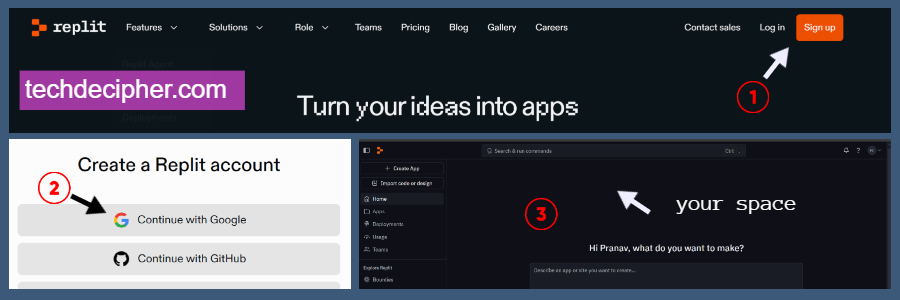
You would just need to log in to the Replit platform using the link here, or you can type replit.com into the Google search engine, which would take you to the Replit site. You would need to sign up since you are a new user by the methods shown on the page.
Step 2) Paste your Idea into the Ghostwriter
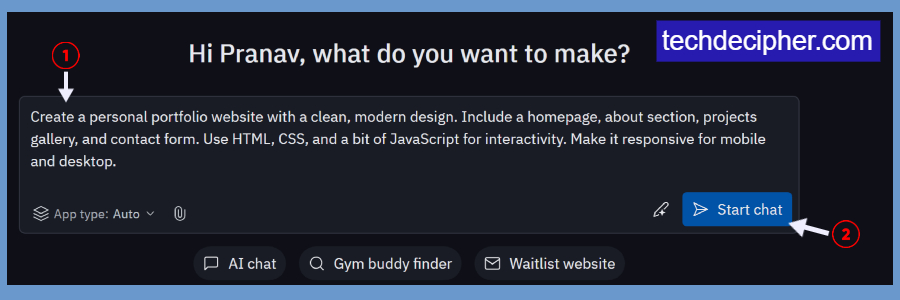
The section you are seeing is basically Replit’s Ghostwriter chat interface. This is where you would put your prompt or ideas. Whatever you describe here, Replit will use it to build. As soon as you finish adding the prompt, hit the Start Chat button. This would start developing your website. Remember, there is no limit; you can design the prompt as per your requirements, just be creative with what you want.
This is the sample prompt you can also copy and use for your use case.
For a Basic Portfolio Website
Create a personal portfolio website with a clean, modern design. Include a homepage, about section, projects gallery, and contact form. Use HTML, CSS, and a bit of JavaScript for interactivity. Make it responsive for mobile and desktop.
For a Basic Android App
Build a Flutter Android app with a splash screen (logo + fade-in). After that, show a scrollable list of animals using a card layout with name and thumbnail. On tapping an animal, navigate to a details screen with a larger image, description, and a fun fact, with smooth transitions. Include a floating button to share the animal info. Add a bottom navigation bar with Home, About, and Contact Us (with a form: name, email, message). Use modern, responsive UI.
Step 3) The preview
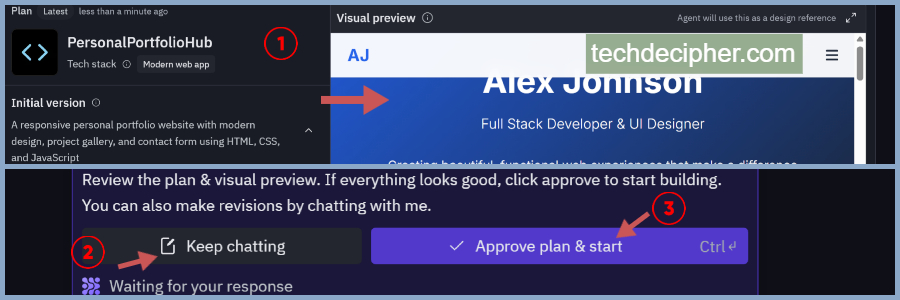
As soon as you hit start chat, the platform will provide you with a dummy design with a preview. You have options: either to approve the design or the change, or you can go back to edit mode, which would let you change your prompt description and hit again to continue.
Step 4) Before Deploy
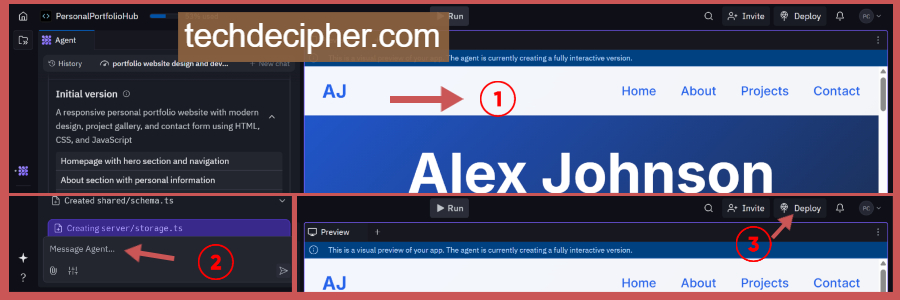
Right after you approve the site design, Replit will design the entire website and provide you with a preview on the right for you to check it. You also have the option to make changes right in this moment. All you need to do is message the agent back, and you can modify as you like. Go through the design preview, and once you are completely confident in it, you will hit the Deploy button.
Step 5) Deploy your site
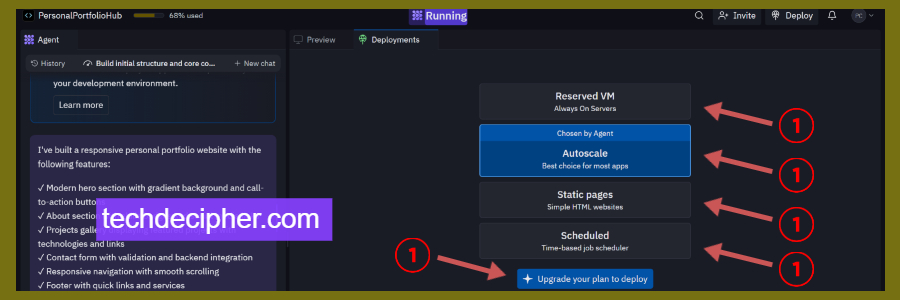
After clicking on the Deploy option, you get 4 deployment options.
- Reserved VM – For always-on apps (paid feature).
- Autoscale – Good for most apps; scales resources when needed.
- Static pages – For simple HTML/CSS/JS websites (free option for static sites)
- Scheduled – For time-based apps like cron jobs
You must know that most deployment plans require a paid plan to be purchased. However, if you wish to use it as a static site or if your site is static, just go with the static pages option. Ensure your website does not hold a database that stores the data; otherwise, the static page option won’t be usable.
Step 6) Map the domain to your new website
Once you upgrade your Replit plan (like ReplitCore or Teams), you do NOT need to host separately — Replit fully hosts your app or website for you, including backend and frontend. Click Deploy → Go to Deployments panel. After deploying, click the settings of the deployed app. You’ll see an option to “Add custom domain”. Enter your domain (e.g., yourdomain.com). Replit gives you DNS records (CNAME or A-record) to update in your domain provider (GoDaddy, Namecheap, etc.) Once DNS propagates, it works like magic — your Replit app is live on your own domain.
Bonus
If you ever want the raw web files, click the 3-dot menu next to the Repl → Download as ZIP. You’ll get full access to HTML/CSS/JS/backend files to host anywhere (like Netlify or GitHub Pages).
Replit free or paid?
Yes, Replit is free, but with a Starter pack! You get 10 apps to build with public links to them. Replit’s free tier is great for getting started, perfect for beginners, and for hobby projects. But if you need private apps, live deployments, or full AI access, upgrading makes a big difference.
Here is the Table comparison for it.
Conclusion
Replit isn’t just another coding platform; it’s a complete rethinking of what coding can be. With its emphasis on “vibe coding,” Replit manages to break down barriers, making software creation accessible to everyone. This concludes How to build apps and sites using Replit. Would you try Replit for your ideas in your mind? Do let us know in the comments section below. I recently published a detailed blog on everything about vibe coding and how it can change things forever. Check the blog here for more. If you need any help or have any suggestions to make, then do reach out via the contact page here. I also provide services to help you with your issues, which you can find here. Happy International Snowdon Race!