
I thought CSS was harmless until this happened. I still remember the first time I heard someone say, “CSS can’t harm your system, it’s just styling.” Honestly, I believed that too. In such tech heavy environment, literally nothing should be skipped or ignored. If you’ve ever thought CSS is “just for design,” this one might change your mind. So I bring you a critical Vulnerability in CSS that can exploit your machine. Take a look at this one seriously.
In today’s post, we are going to check out what a critical Vulnerability is, what is the CVE-2026-2441, how CVE-2026-2441 works, how CVE-2026-2441 is identified, and how to make sure you are safe. Without further ado, let’s get started!
What is a Critical Vulnerability?

Before we get into the scary stuff, let’s clear something up. A critical vulnerability is basically a security flaw so severe that it can be exploited to let attackers run malicious code, crash your system or browser, steal sensitive data, or even take control of your device in extreme cases. These aren’t your average bugs. The “critical” part means it’s not just theoretical, it can actually be exploited in real-world scenarios. And the worst part? You don’t always need to click anything suspicious. Sometimes, just visiting a webpage is enough.
What is the CVE-2026-2441: Critical CSS Use-After-Free?
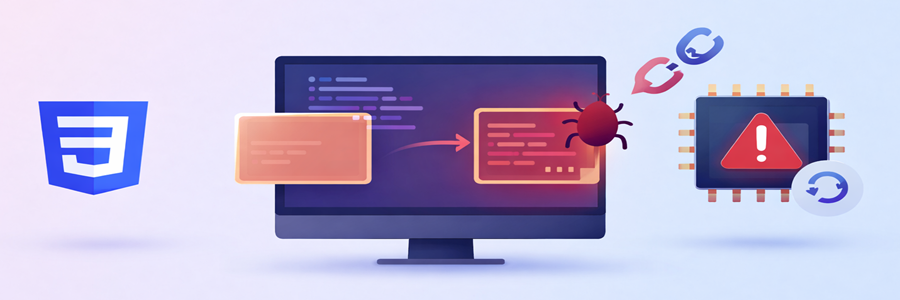
Recently, a vulnerability named CVE-2026-2441 started making noise in the security community. At first glance, it sounds surprising. I was asking myself how can CSS just styling, can lead to exploitation? But this one is different. CVE-2026-2441 is a newly discovered vulnerability tied to how browsers handle CSS specifically, a memory related issue called “Use-After-Free”.
Let me break that down in simple terms. When a browser processes a webpage, it constantly allocates and frees memory. Sometimes, due to poor handling, it tries to use memory that’s already been freed. That’s like trying to use a chair that’s already been removed from the room. And attackers? They love this kind of mistake. Because if they can control what gets placed in that “freed” memory space, they can inject malicious code, manipulate browser behavior, and also potentially execute commands on your system.
And yes, this can be triggered via CSS. Not JavaScript. Not downloads. Just CSS. This issue affects how browsers handle CSS internally. Under certain conditions, attackers can trigger it to manipulate memory. Attackers can exploit this by inserting their own data into that freed space. And suddenly they’re controlling what happens next.
How CVE-2026-2441 works?
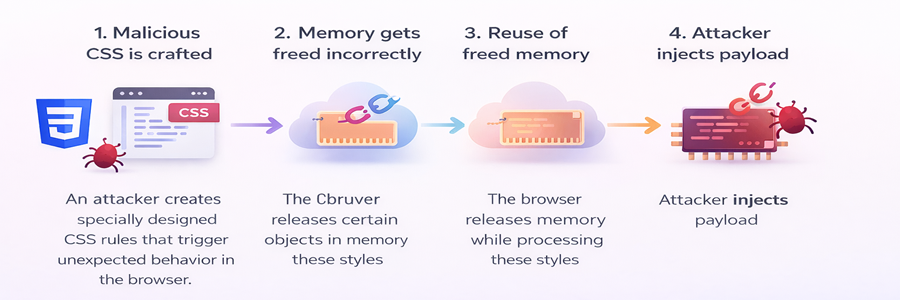
Here’s a simplified flow of how this vulnerability can be abused.
Step 1: Malicious CSS is crafted
An attacker creates specially designed CSS rules that trigger unexpected behavior in the browser.
Step 2: Memory gets freed incorrectly
The browser releases certain objects in memory while processing these styles.
Step 3: Reuse of freed memory
The browser mistakenly tries to reuse that freed memory.
Step 4: Attacker injects payload
At this point, attackers can manipulate the memory space and execute malicious actions.
For instance, imagine you open a seemingly harmless website (techdecipher.com is super safe, don’t worry!), maybe a blog, maybe a news article site. You don’t download anything, you are just scrolling. Behind the scenes, a malicious CSS payload is doing its thing. When your browser hits that vulnerability, your system can suddenly behave oddly, a hidden script can execute, and attackers can expose sensitive data. And you’d have no idea it started with CSS.
How CVE-2026-2441 is identified?
Interestingly, this wasn’t discovered overnight. Security researchers noticed unusual behavior in browser rendering engines, especially when handling complex CSS animations and dynamic style updates. During deeper testing, they found memory inconsistencies, Unexpected crashes, and Reproducible patterns tied to CSS processing. Eventually, they isolated the issue and confirmed it as a Use-After-Free vulnerability. What stood out was how non-obvious it was. No obvious malicious scripts, just styling. That’s what made it slip under the radar initially.
You might be thinking okay, but I’m not a developer. Why should I care? Here’s the thing, this doesn’t target developers, it targets users. If your browser has a vulnerability, attackers can infect your system just by you browsing. They can steal your saved passwords and hijack your session data (logins, cookies). The worst part is, you might not even notice anything unusual.
How to make sure you are safe?
You don’t need to panic, but you do need to be aware.
1. Keep Your Browser Updated.

Seriously, Don’t Ignore This. Most major browsers patch vulnerabilities like this quickly.
- Chrome
- Firefox
- Edge
- Safari
If you’re not updating regularly, you’re basically leaving your door unlocked. You can also turn on auto updates. It’s the easiest win.
2. Avoid Sketchy or Unknown Websites

I know, this sounds obvious. But it matters more than ever. If a site feels off, even slightly, trust that instinct. Especially pirated content sites, random streaming pages and unknown download portals. These are prime spots for hidden exploits.
3. Watch for Strange Behavior

Your system often gives hints when something’s wrong. Look out for random browser crashes, unusual CPU spikes, tabs freezing unexpectedly or unknown processes running. Don’t ignore these signs.
Frequently Asked Questions (FAQ)
1. Can CSS really hack my computer?
2. Do I need antivirus to stay safe from this?
3. Are all browsers affected by this vulnerability?
4. How do I check if my browser is updated?
Conclusion
What surprised me most about this whole situation wasn’t just the vulnerability it was where it came from that is CSS. The thing we usually associate with colors and layouts. That’s the reality of modern tech. The more powerful things become, the more careful we need to be. This concludes Critical Vulnerability in CSS that can exploit your machine. When did you update your browser last time? or did you just assume it was okay? Do let us know in the comments section below. If you have a website and you wish to purge malwares out of it then you can refer to the blog that I have written when I was working in hosting domain. Check out here for more. We have collection of top class web tools baked right into Techdecipher.com. To go to the tools page, click here. If you need any help or have any suggestions to make, then do reach out via the contact page here. I also provide services to help you with your issues, which you can find here. Happy Earth Hour Day!
