
You create an Amazon EKS cluster and discover that the managed control plane was only the beginning. Worker nodes still need scaling, networking, storage, load balancing, patches, and upgrades. Amazon EKS gives you control, but that control comes with a long operational checklist. EKS Auto Mode is AWS’s attempt to shorten that checklist. It keeps Kubernetes and an EC2-based data plane while letting AWS manage more of the infrastructure underneath. That sounds simpler, but every responsibility does not disappear.
In today’s post, we are going to check out what EKS Auto Mode is, how it differs from standard EKS, its tradeoffs, and whether it truly makes Kubernetes simpler. Without further ado, let’s get started!
What is EKS Auto Mode?

Amazon EKS Auto Mode is a feature that extends AWS management beyond the Kubernetes control plane to handle your cluster’s core infrastructure automatically. You can enable it when creating a new EKS cluster or turn it on for a compatible existing cluster. With standard Amazon EKS, AWS manages the Kubernetes API server and etcd database, while you remain responsible for provisioning, updating, and scaling worker nodes along with operating supporting cluster add-ons.
Auto Mode moves much of that data plane work into the EKS service. Your containers still run on EC2 instances in your AWS environment, but Auto Mode treats those nodes as managed infrastructure. You deploy normal Kubernetes objects, and AWS handles more of the machinery that turns them into working capacity. In short, it shifts the day-to-day infrastructure management to AWS so you can focus on deploying and running your workloads
What AWS Manages for You with EKS Auto Mode

Compute and scaling
Auto Mode watches for pods that cannot be scheduled. It uses Karpenter-based scaling to launch suitable EC2 instances, then removes or consolidates nodes when demand falls. You can guide the decision through NodePools and NodeClasses, including capacity type, subnets, and storage settings.
Networking, storage, and load balancing
Features that often arrive as separate add-ons are built into Auto Mode. AWS manages pod networking, network policy support, EBS CSI storage, and integration with Application and Network Load Balancers. Your team operates fewer controllers and drivers.
Node security and updates
Auto Mode nodes use immutable AMIs with SELinux enforcement and read-only root file systems. AWS blocks direct SSH and Systems Manager access. The managed instance guide explains that AWS chooses the AMI and handles patching. Nodes have a maximum 21-day lifetime, after which Auto Mode replaces them, subject to disruption settings.
A Practical Example
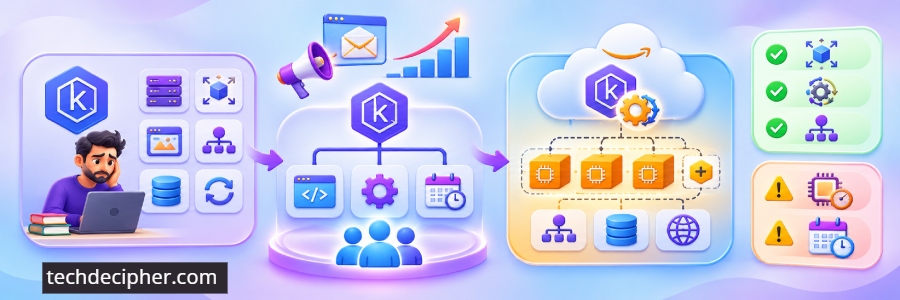
Imagine a small team running a web API, a background worker, and a nightly report. Traffic climbs sharply after a marketing email. With standard EKS, the team might maintain node groups, scaling rules, AMIs, the load-balancer controller, and the EBS CSI driver.
With Auto Mode, the team defines pod resources and availability requirements. Auto Mode launches capacity when needed and consolidates workloads when demand falls. A Kubernetes Service or Ingress can also trigger an AWS load balancer without a separately managed controller.
That is a useful simplification. However, poor CPU requests can waste capacity, restrictive disruption budgets can delay maintenance, and broken applications remain broken. Auto Mode manages infrastructure. It does not understand your business logic.
How is it different from EKS?
| 📌 Area | ☁️ Standard Amazon EKS | ⚡ EKS Auto Mode |
|---|---|---|
| Worker Capacity | You manage node groups, Fargate, or a scaling tool such as Karpenter. | AWS provisions and scales managed EC2 nodes based on workload demand. |
| Core Components | Your team operates several networking, storage, and load-balancer add-ons. | Key networking, storage, and load-balancing capabilities are integrated and managed by AWS. |
| Node Lifecycle | You plan AMI updates, patching, and node replacement. | AWS automatically patches and replaces managed nodes. |
| Host Access | Custom AMIs and direct node access can be available, depending on your configuration. | AWS selects the AMI. Direct SSH and SSM access to Auto Mode nodes are not available. |
| Cost Model | EKS cluster fee plus the AWS infrastructure resources you consume. | EKS cluster and infrastructure costs, plus an additional Auto Mode management charge for managed nodes. |
Costs and Tradeoffs
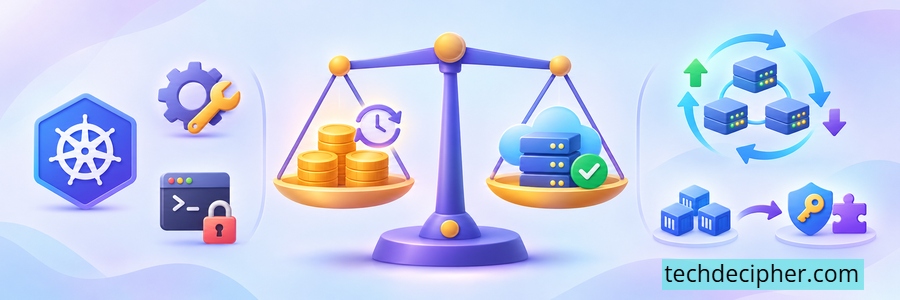
Auto Mode is not included with the normal cluster charge. The Amazon EKS pricing page says it adds a management fee based on the type and running time of managed EC2 instances. You still pay for the cluster and other AWS resources used by the architecture. The tradeoff is operational time versus service cost and control. A small team may pay the fee to avoid running Karpenter, controllers, drivers, and node update pipelines. Teams with mature automation, custom AMIs, host software, or direct-access requirements may prefer standard EKS.
Migration also deserves planning. AWS supports enabling Auto Mode on an existing cluster, but it requires IAM changes, compatible add-ons, and workload migration. Review the prerequisites before treating the console toggle as the whole job. TechDecipher also has a guide to configuring the AWS CLI.
Who Should Consider EKS Auto Mode
Auto Mode suits teams that want Kubernetes APIs without building a platform around routine data-plane operations. It can help application teams launch with sensible defaults if they accept AWS’s managed-node restrictions. Standard EKS fits better when node customization is central, or an experienced platform team already runs a dependable setup. Simpler helps only when the opinionated model matches the workload.
Frequently Asked Questions (FAQ)
Can I enable EKS Auto Mode on an existing cluster?
Can I SSH into an Auto Mode node?
Does Auto Mode remove the need for Kubernetes knowledge?
Conclusion
EKS Auto Mode makes Kubernetes on AWS simpler. AWS manages more of the worker node lifecycle and turns important add-ons into built in capabilities, removing substantial maintenance from a small team. The choice depends on whether lower maintenance is worth more than node level freedom and the added fee. This concludes our discussion on what is EKS Auto Mode, and is AWS is making Kubernetes Simpler. How does your firm manage Kubernetes workloads, would you use EKS Auto Mode feature? Do let us know in the comments section below. If you lost access to your EC2 instance because you lost a PEM file, check the blog here on how to recover it. We have collection of top class web tools baked right into Techdecipher.com. To go to the tools page, click here. If you need any help or have any suggestions to make, then do reach out via the contact page here. I also provide services to help you with your issues, which you can find here. Happy Revolution Day (Mexico)!
